
Case Study
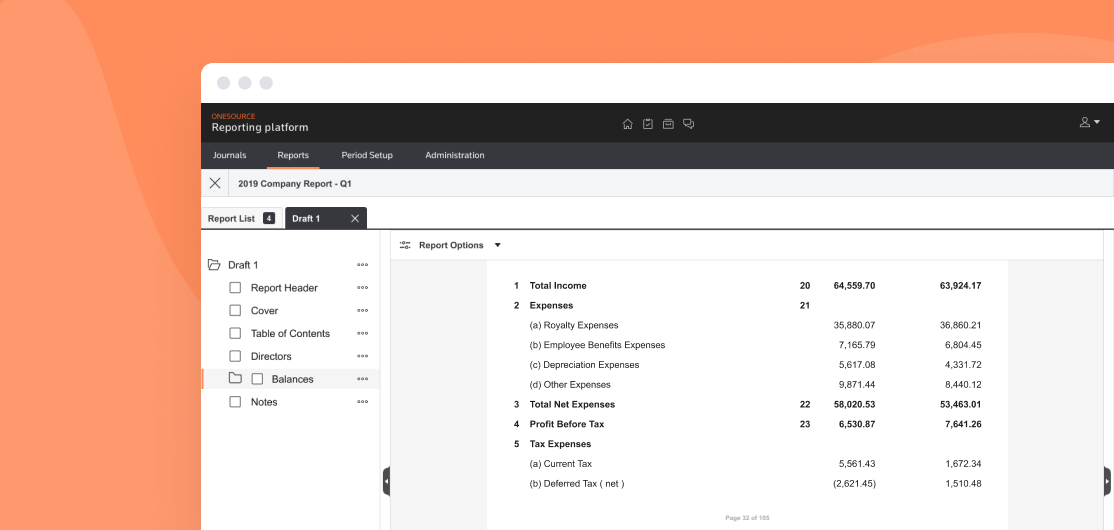
Thomson Reuters offers a suite of corporate tax products, and one - OneSource Statutory Reporting - was in need of an update. Statutory reporting is mandatory financial disclosure reporting, and our current solution was a decade only, windows only software app that was showing its age. Our goal was to bring it into modern day standards as a browser agnostic web app, merging it into the broader OneSource product suite
I picked this project up shortly after it was refunded - it has previously had 2 iterations of work done, bringing it into a bare bones MVP - before being defunded. A budget was finally available for work to resume, and our goal was to bring cohesion to an app that had 3 different designers over the course of as many years. We had match our soon to be sunset software application 1:1 on feature parity, and launch it to a small target audience by Q1 2021

01
Our first task was understanding who are target audience was, and what their needs were. The early MVP was built entirely off a short feature list, with very little user feedback or input. Thru one on one interviews, market & competitive research, and data gathered from out legacy app, we were able to come up with a list of what users needed, what their pain points were, and what they liked about our legacy product. Some of the biggest stand outs talking to our clients were:
Users did not understand why the legacy app was being sunset, and did not want to move
We found out our professional services team was doing a bulk of the data entry for our customers, which was not going to be an option going forward
Early users found it difficult/unclear when importing data into the new web app
Our application was slow
Users were stuck staring at a single page for long periods of time waiting for data to process
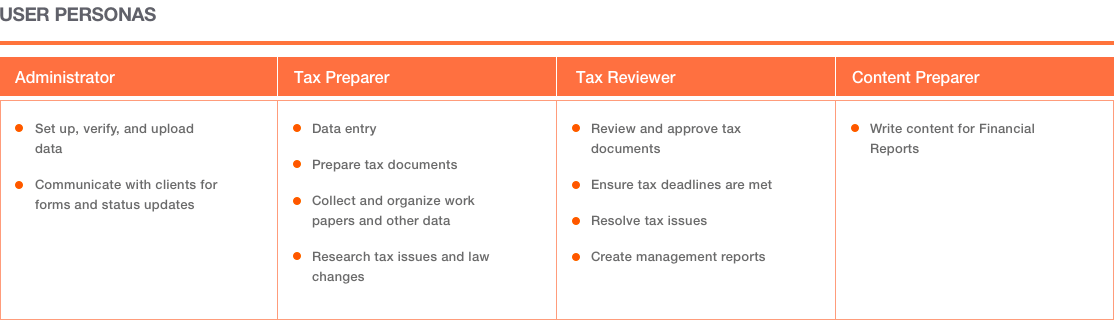
We found 4 major user personas or job roles that made up our customer base. Each had a very specific use, and each used our app differently
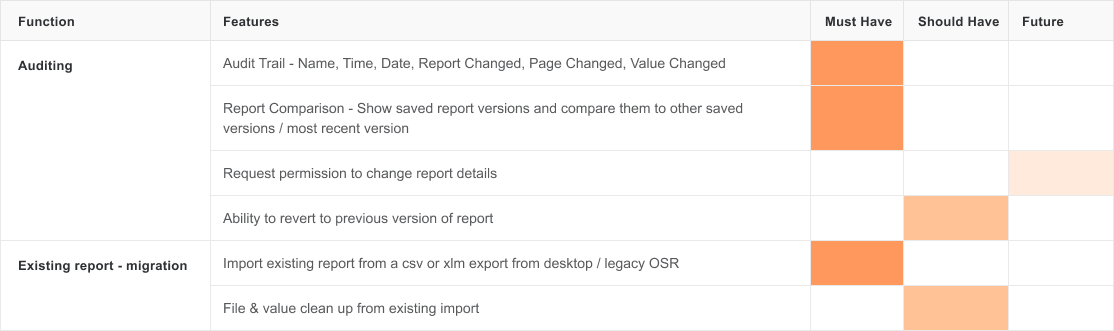
Working with what we already had built, and building off what key features our users needed, we built a feature list and prioritised the functionality they needed first, with ease of life features slated for later release
02
Our legacy app had been around for a while, and had a healthy user base. They had spent years importing and building key data points, building reports, and taking advantage of smart expressions and variables to make their jobs easier and less error prone
To get them comfortably onto our application, we had to help them import their data - and categorize it correctly in order to take advantage of the key selling points - our smart expressiosn and variable builders. To do this, we built a bulk importer that handled xml files that were exported from our old app, and brought them into the new.
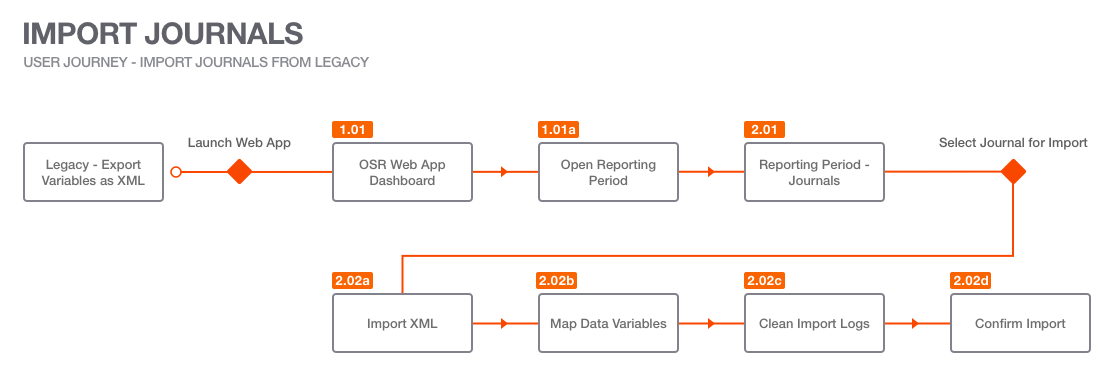
The process of exporting data from our outgoing application, and importing/arranging it into our new web app - one step to export, 4 steps to import kept things simple
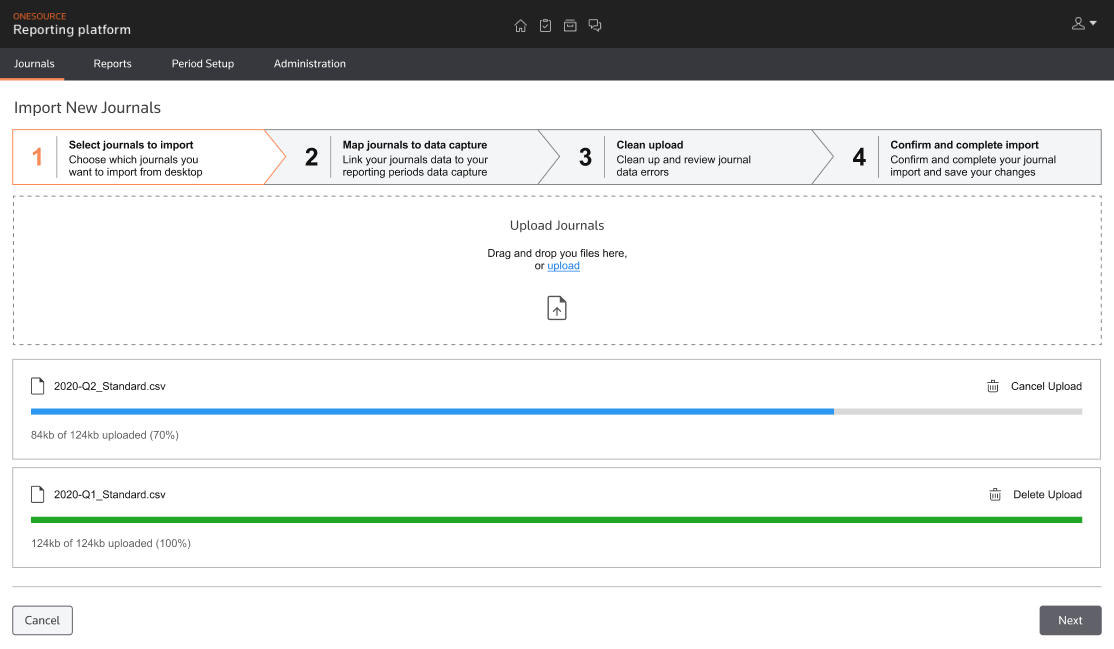
Our 4 step wizard walked users thru the process of importing data, allowing bulk imports while keeping progress clear
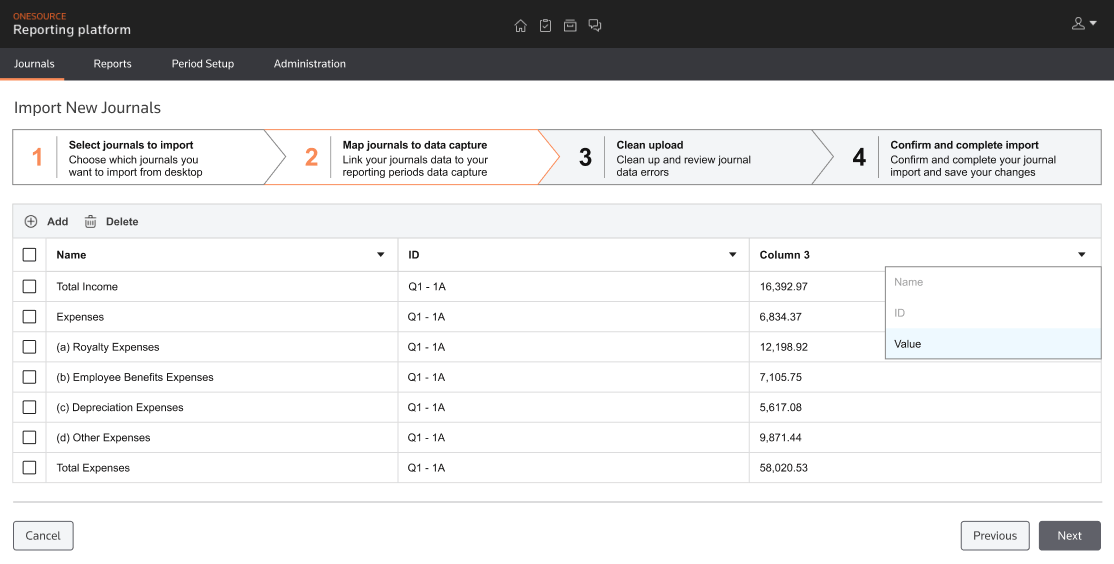
Once the XML or CSV files had been imported, users had to map the data points in the specific columns to one of 3 variable types to allow for easy re-use in the future
03
Our strenght as a product came in allowing users to use/reuse variables and smart expressions to auto populate long reports that would be tedious and time consuming - as well as error prone - to build manually
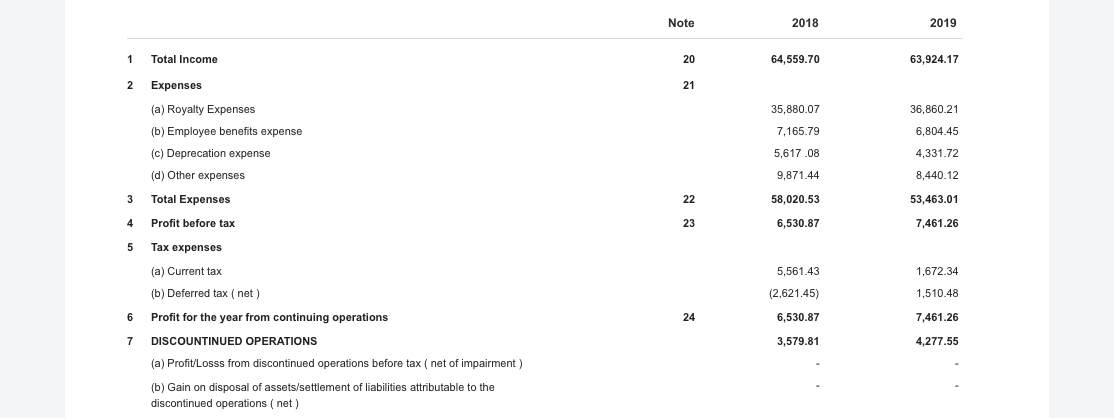
A small example of what a page out of statutory reports usually looks like - a lot of precise data points, calculations, and repetition - these reports were usually 100's of pages long
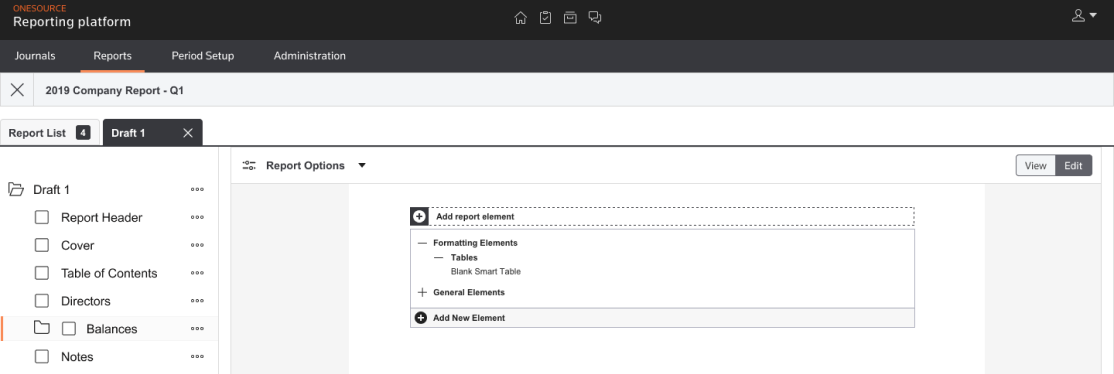
Our report builder allowed users to navigate thru the heirarchy of a traditional report, copy and cary over data from previous years, half years, or quarters, and manually add new report elements
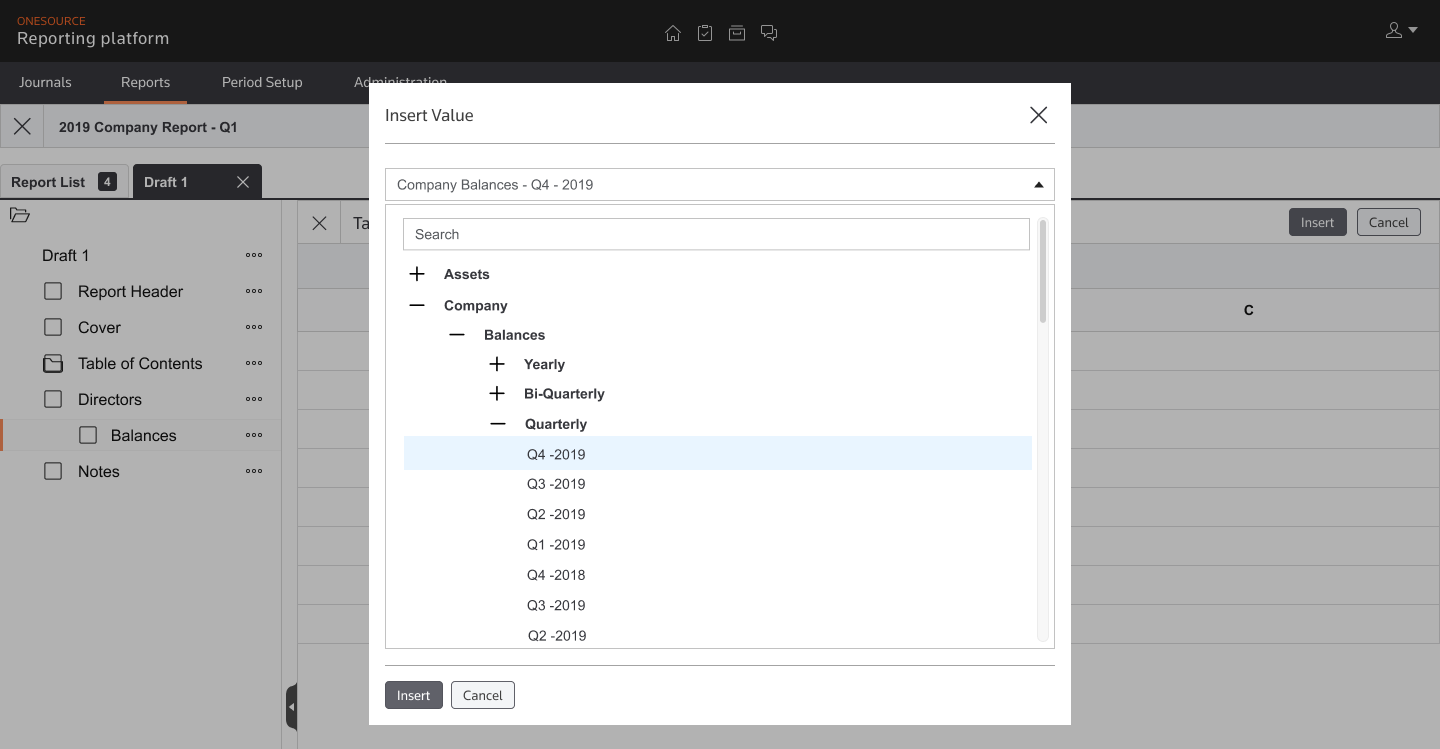
By assigning a value to a column, users could automatically populate - and reference - 100s of data points in no time.............
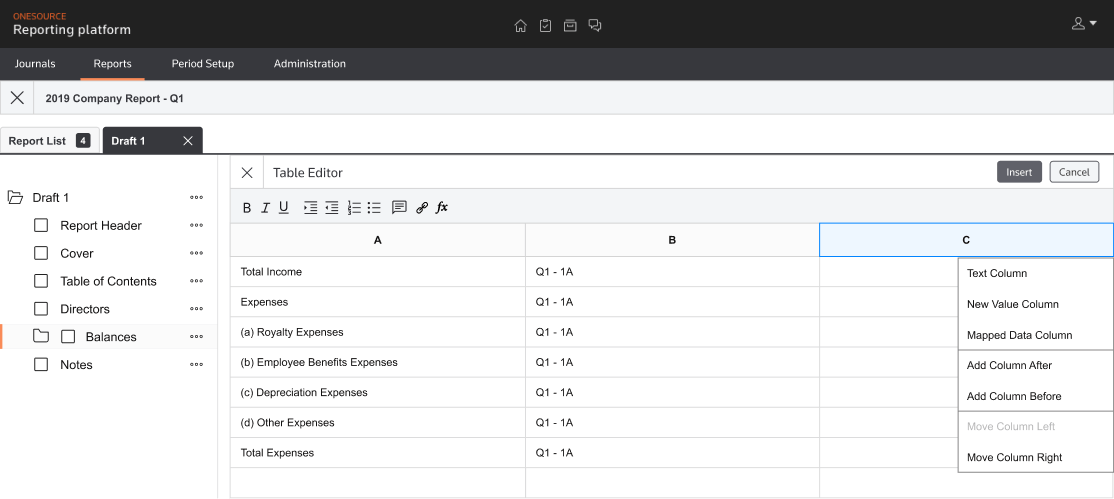
One of our biggest wins came during a 2 sprint period where we revamped the previous manual tables - where users had to manually type in data - to a smart table that allowed users to pull variables from previously imported data journals, as well as build expressions to quickly populate columns, rows, and even full tables in minutes
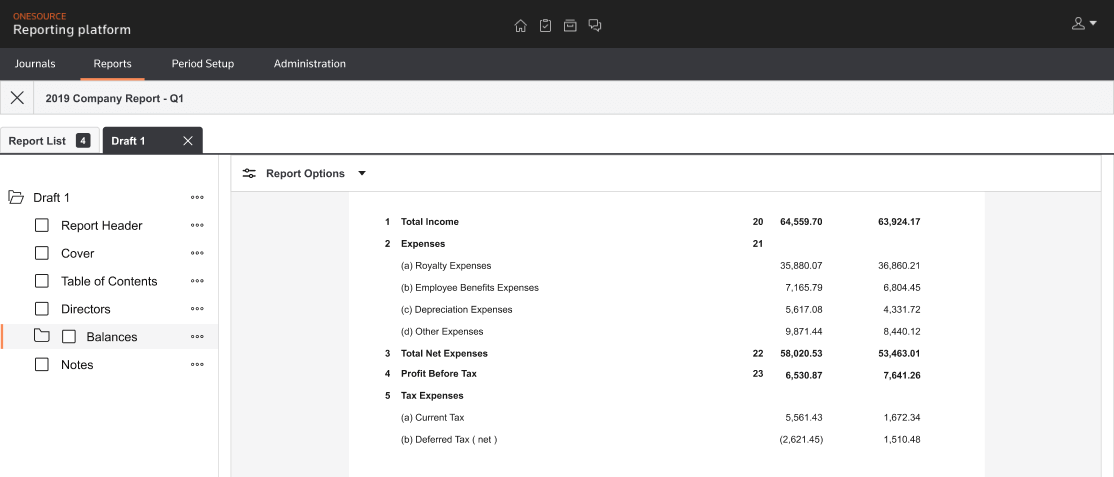
An example of a finished balance table, which could be built using variables and smart content in, on average, under a minute
04
After the tax preparer created the initial report, tax report reviewers would come in after to review the reports for accuracy and quality. They needed an efficient way to make notes and leave feedback for revisions and updates. To solve for this problem, we implemented a 3rd party api allowing us to create & resolve conflicts via threaded messages
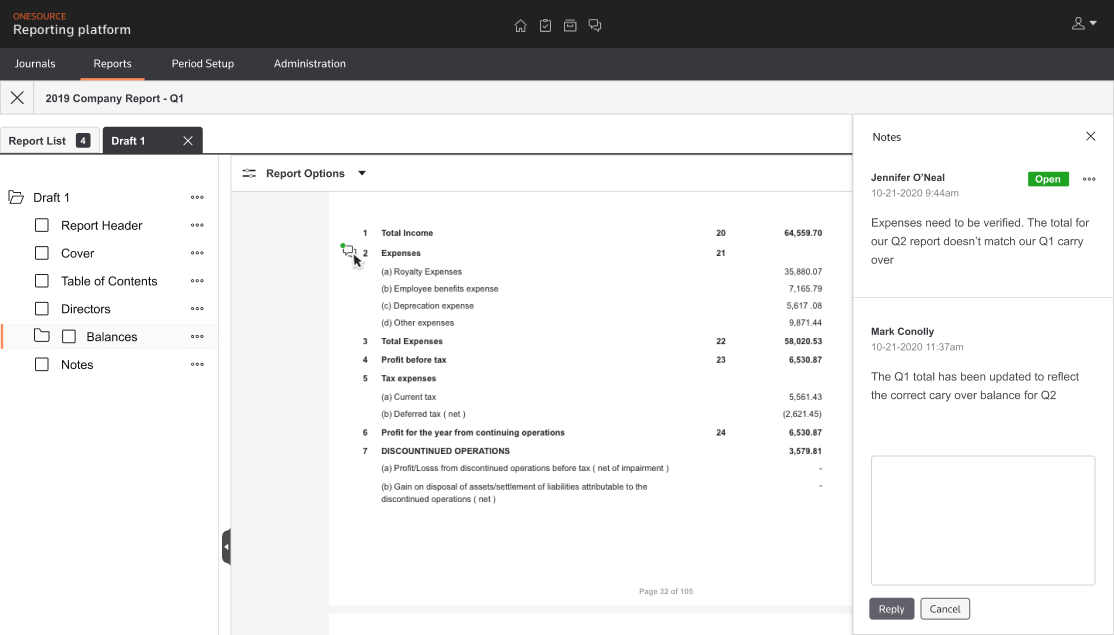
A note icon with a green status indicated an open message status. In the notes pane, users could reply to the original comment. Usage was pared down to a single comment & subsequent replies only, to keep preparers on task
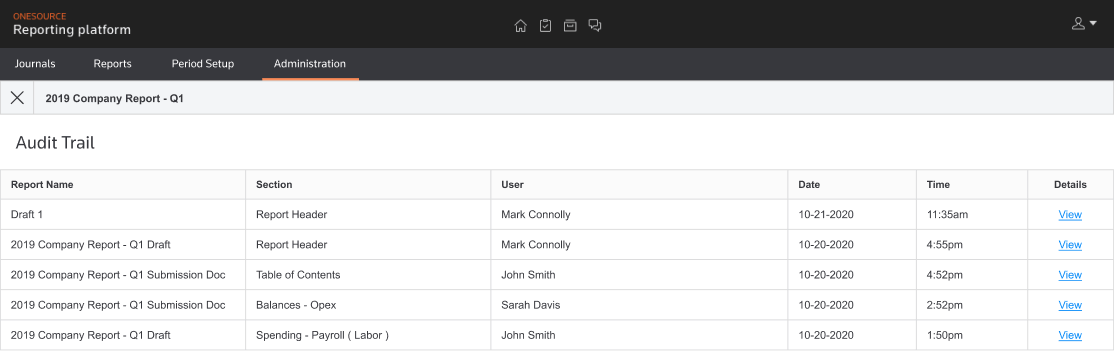
Building an audit trail let our users see what was changed, who changed it, when it was changed, and what report/section was altered. This brought transparency into the report editing/updating process
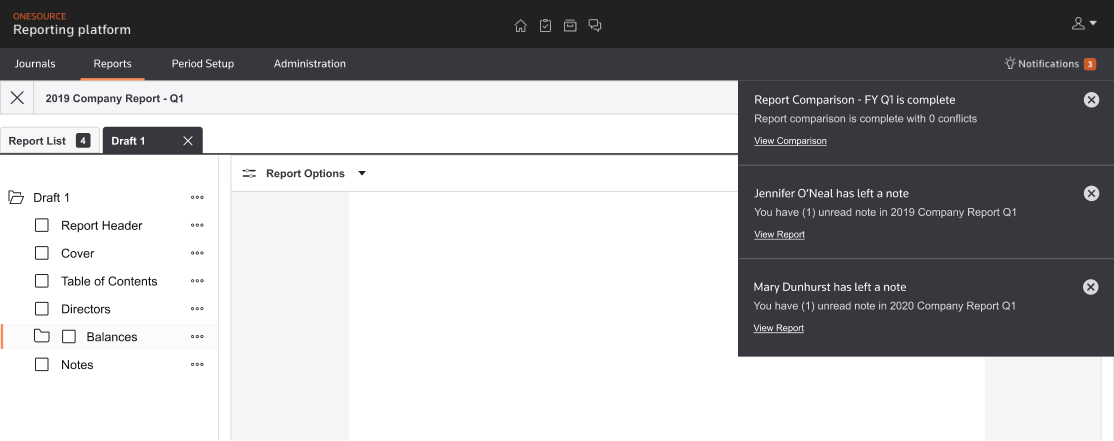
Instead of making tax preparers hunt down any open notes, or wait for internal communications that there was a note that needed clarity, we introduced a notifications tab on the top navigation. This also helped serve as a central hub to let users know the status of long running processes
05
OneSource Statutory Reporting successfully launched on time late 2020, after many iterations, budget issues, and draw downs. This was largely a result of working with a dynamic and hard working engineering and product team, who kept an active roadmap and well documented requirements
When I left, the team was making the transition from Angular JS which was being sunset, to Angular 9, where our current design system would be implemented, keeping the product on brand and making quick iterations possible. Well documented product hub pages, consistently named and marked up mock ups, and strong documentation of the work done, as well as explanations as to why it was done, should keep OSR running strong in the future
Before we restarted this project, we set out two large goals. We wanted to keep the import process simple - and quick! - while allowing the power of variables and expressions do the heavy lifting to make report building faster

We saw drastic improvements in both import and report buiding. This was a team win - development and engineering made a huge lift here in managing the data, and we were able to leverage it into a very user friendly interace that shaved days ( or weeks! ) off the time spent on task